
3Com Switch 7750 Configuration Guide

IGMP Configuration Tasks 457
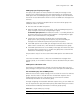
interface of the switch may fail when plenty of multicast groups join in the routing
interface.
You can configure limit on the number of IGMP multicast groups on the interface
of the switch. Thus, when users are ordering the programs of multicast groups,
the network bandwidth can be controlled because the number of multicast groups
is limited.
Limiting the range of multicast groups that the interface serves
The Layer 3 switch determines the membership of the network segment through
translating the received IGMP join messages. You can configure a filter for each
interface to limit the range of multicast groups that the interface serves.
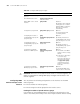
Table 365 Configure IGMP multicast groups on the interface
Operation Command Description
Enter system view system-view -
Enable the multicast routing
protocol
multicast routing-enable Required
Enter VLAN interface view interface Vlan-interface
interface-number
-
Enable IGMP on the current
interface
igmp enable By default, if the IP multicast
routing protocol is enabled
globally, IGMP is enabled on
all the layer-3 interfaces
automatically.
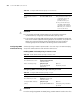
Configure limit on the
number of IGMP groups on
the interface
igmp group-limit limit Optional
By default, the number of
multicast groups on a VLAN
interface is 256.
Limit the range of multicast
groups that the interface
serves
igmp group-policy
acl-number [ 1 | 2 | port
interface-type
interface-number [ to
interface-type
interface-number ]]
Optional
■ By default, the filter is not
configured, that is, any
multicast group is
permitted on a port.
■ If the port keyword is
specified, the specified
port must belong to the
VLAN of the VLAN
interface.
■ You can configure to filter
the IP addresses of some
multicast groups in ACL.
■ 1 and 2 are the IGMP
version numbers. IGMPv2
is used by default.
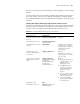
Quit interface view. quit -
Enter Ethernet port view interface interface-type
interface-number
-