
3Com Switch 7750 Configuration Guide


436 CHAPTER 43: IGMP SNOOPING CONFIGURATION
Configuring IGMP
Snooping Simulated
Joining
Generally, hosts running IGMP respond to the IGMP query messages of the IGMP
querier. If hosts fail to respond for some reason, the multicast router may consider
that there is no member of the multicast group on the local subnet and remove
the corresponding path.
To avoid this from happening, you can configure a port of the IGMP-enabled VLAN
interface as a multicast group member. When the port receives IGMP query
messages, the simulated member host will respond. As a result, the subnet
attached to the Layer 3 interface can continue to receive multicast traffic.
Through this configuration, the following functions can be implemented:
■ When an Ethernet port is configured as a simulated member host, the
simulated host sends an IGMP report through this port. Meanwhile, the
simulated host sends the same IGMP report to itself and establishes a
corresponding IGMP entry based on this report.
■ When receiving an IGMP general query, the simulated host responds with an
IGMP report. Meanwhile, the simulated host sends the same IGMP report to
itself to ensure that the IGMP entry does not age out.
■ When the simulated joining function is disabled on an Ethernet port, the
simulated host sends an IGMP leave message.
Therefore, to ensure that IGMP entries will not age out, the port must receive
IGMP general queries periodically.
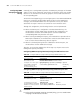
Configuring IGMP Snooping simulated joining in VLAN interface view
Configuring IGMP Snooping simulated joining in Ethernet port view
c
CAUTION:
■ Before configuring IGMP Snooping simulated joining, you must enable IGMP
Snooping in VLAN interface view first.
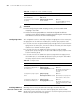
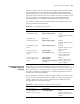
Table 347 Configure IGMP Snooping simulated joining in VLAN interface view
Operation Command Description
Enter system view system-view -
Enter interface view interface Vlan-interface interface-number -
Configure one or more ports
in the VLAN as simulated
member host(s) of the
specified multicast group
igmp host-join group-address [ source-ip
source-address ] port interface-list
Optional
Disabled by
default
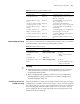
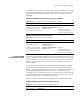
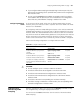
Table 348 Configure IGMP Snooping simulated joining in Ethernet port view
Operation Command Description
Enter system view system-view -
Enter Ethernet port view interface interface-type
interface-number
-
Configure the port in the
specified VLAN as a simulated
member host of the specified
multicast group
igmp host-join
group-address [ source-ip
source-address ] vlan vlan-id
Optional
Disabled by default