
3Com Switch 7750 Configuration Guide

Troubleshooting IP Routing Policy 385
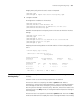
# Apply route policy when the static routes are imported.
[SwitchA] ospf
[SwitchA-ospf-1] import-route static route-policy ospf
2 Configure SwitchB:
# Configure the IP address of the interface.
<SwitchB> system-view
[SwitchB] interface vlan-interface 100
[SwitchB-Vlan-interface100] ip address 10.0.0.2 255.0.0.0
[SwitchB-Vlan-interface100] quit
# Enable the OSPF protocol and specify the ID of the area to which the interface
belongs.
[SwitchB] router id 2.2.2.2
[SwitchB] ospf
[SwitchB-ospf-1] area 0
[SwitchB-ospf-1-area-0.0.0.0] network 10.0.0.0 0.255.255.255
[SwitchB-ospf-1-area-0.0.0.0] quit
[SwitchB-ospf-1] quit
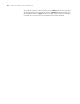
# Display the OSPF routing tables on Switch B and check if the routing policy takes
effect.
< SwitchB >display ospf 1 routing
OSPF Process 1 with Router ID 2.2.2.2
Routing Tables
Routing for Network
Destination Cost Type NextHop AdvRouter Area
10.0.0.0/8 10 Net 10.0.0.1 1.1.1.1 0.0.0.0
Routing for ASEs
Destination Cost Type Tag NextHop AdvRouter
20.0.0.0/8 1 2 1 10.0.0.1 1.1.1.1
40.0.0.0/8 1 2 1 10.0.0.1 1.1.1.1
Total Nets: 1
Intra Area: 1 Inter Area: 0 ASE: 2 NSSA: 0
Troubleshooting IP
Routing Policy
Symptom: Routing information cannot be filtered when the routing protocol runs
normally.
Solution: Check to see the following requirements are satisfied.
At least one node in a route-policy should be in permit mode. When a
route-policy is used to filter routing information, if a piece of routing information
filters through no node in the route-policy, it means that the route information
does not pass the filtering of the route-policy. Therefore, when all the nodes in the
route-policy are in the deny mode, no routing information will pass the filtering of
the route-policy.
At least one item in an ip-prefix list should be in permit mode. The items in deny
mode can be defined first to rapidly filter out the routing information not meeting