
3Com Switch 7750 Configuration Guide


356 CHAPTER 36: BGP CONFIGURATION
c
CAUTION:
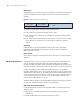
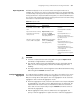
■ A router must be assigned a router ID in order to run BGP protocol. A router ID
is a 32-bit unsigned integer. It uniquely identifies a router in an AS.
■ A router ID can be configured manually. If no router ID is configured, the
system will automatically select an IP address from the IP addresses of the
interfaces as the router ID. A router ID is selected in the following way: if
loopback interface addresses are configured, the system chooses the latest
configured IP address as the router ID; if no loopback interface is configured,
the first configured IP address among the IP addresses of other interfaces will
be the router ID. For network reliability consideration, you are recommended
to configure the IP address of a loopback interface as the router ID.
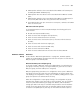
■ Router IDs can be re-selected. A re-selected router ID takes effect only after the
BGP process is restarted.
■ Normally, EBGP peers are connected through directly connected physical links.
If no such link exists, you need to use the peer ebgp-max-hop command to
allow the peers to establish multiple-hop TCP connections between them.
Configuring the Way
to Advertise/Receive
Routing Information
Configuration
Prerequisites
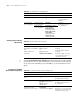
Make sure the following operation is performed before configuring the way to
advertise/receive BGP routing information.
■ Enabling the basic BGP functions
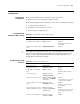
Make sure the following information is available when you configure the way to
advertise/receive BGP routing information.
■ The aggregation mode, and the aggregated route.
■ Access list number
■ Filtering direction (advertising/receiving) and the route policies to be adopted.
■ Route dampening settings, such as half-life and the thresholds.
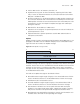
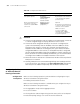
Specify the source interface for
route update packets
peer { group-name |
ip-address }
connect-interface
interface-type
interface-number
Optional
By default, the source interface
of the optimal route update
packets is used.
Allow routers that belong to
non-directly connected
networks to establish EBGP
connections.
peer group-name
ebgp-max-hop
[hop-count ]
Optional
By default, routers that belong
to two non-directly connected
networks cannot establish
EBGP connections.
You can configure the
maximum hops of EBGP
connection by specifying the
hop-count argument.
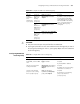
Table 290 Configure basic BGP functions
Operation Command Description