
3Com Switch 7750 Configuration Guide




334 CHAPTER 35: IS-IS CONFIGURATION
■ Configuring routing cost type
■ Configuring link state routing cost
■ Configuring LSP parameters
■ Configuring SPF parameters
4 Networking configuration
■ Configuring authentication
■ Configuring overload tag
■ Configuring adjacency state output
■ Configuring mesh group for an interface
■ Disabling the sending of IS-IS packets
5 Some operation commands
■ Clearing IS-IS data structure
■ Clearing IS-IS specific neighbor
Enabling IS-IS IS-IS can be enabled only after you create an IS-IS routing process and enable this
routing process on the interfaces that may be associated with other routers.
Configuring a NET A NET defines the current IS-IS area address and router system ID.
Enabling IS-IS on the
Specified Interface
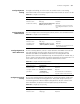
Configuring DIS Priority In a broadcast network, IS-IS needs to select a router as DIS.
When a DIS needs to be selected from the IS-IS neighbors on the broadcast
network, the Level-1 DIS and Level-2 DIS should be selected respectively. The
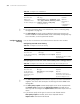
Table 252 Enabling IS-IS
Operation Command Description
Enter system view system-view -
Configure ISIS isis [ tag ] Required
By default, no IS-IS routing
process is enabled.
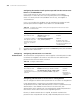
Table 253 Configure a NET
Operation Command Description
Enter system view system-view -
Enter IS-IS view isis [ tag ] -
Enable network entity network-entity net Required
Table 254 Enable IS-IS on the specified interface
Operation Command Description
Enter system view system-view -
Enter interface view interface interface-type
interface-number
Required
Enable IS-IS. isis enable [ clns | ip ] [ tag ] Required