
3Com Switch 7750 Configuration Guide


Static Route Configuration Example 287
Static Route
Configuration
Example
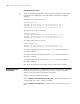
Network requirements
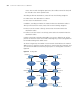
As shown in Figure 69, it is required that all the hosts/Layer 3 switches in the
figure can communicate with each other by configuring static routes.
Network diagram
Figure 69 Static route configuration
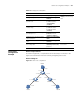
Table 212 Display the routing table
Operation Command Description
Display routing table summary display ip routing-table You can execute the
display command in any
view.
Display routing table details display ip routing-table
verbose
Display the detailed information of a
specific route
display ip routing-table
ip-address [ mask ]
[ longer-match ]
[ verbose ]
Display the routes in a specified
address range
display ip routing-table
ip-address1 mask1
ip-address2 mask2
[ verbose ]
Display the routes discovered by a
specified protocol
display ip routing-table
protocol protocol
[ inactive | verbose ]
Display the tree-structured routing
table information
display ip routing-table
radix
Display the statistics of the routing
table
display ip routing-table
statistics
Clear the statistics about a protocol in
the routing table
reset ip routing-table
statistics protocol { all |
protocol }
Use the reset command
in user view.
1.1.5.2/24
Switch BSwitch A
Switch C
Host C
Host A
Host B
1.1.5.1/24
1.1.1.1/24
1.1.1.2/24
1.1.2.2/24
1.1.2.1/24 1.1.3.2/24
1.1.3.1/24
1.1.4.1/24
1.1.4.2/24