
3Com Switch 7750 Configuration Guide

Command Level/Command View 23
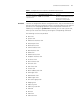
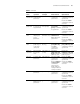
M-Ethernet
interface
view
Configure
M-Ethernet
interface
parameters
[SW7750-M-Eth
ernet0/0/0]
Manage Ethernet
port view.
Execute the
interface
m-ethernet 0/0/0
command in
system view.
Execute the quit
command to return to
system view.
Execute the return
command to return to
user view.
Ethernet
port view
Configure
Ethernet port
parameters
[SW7750-Ethern
et3/0/1]
100 M Ethernet
port view
Execute the
interface
ethernet 3/0/1
command in
system view.
Execute the quit
command to return to
system view.
Execute the return
command to return to
user view.
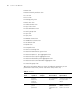
[SW7750-Gigabi
tEthernet4/0/1]
Gigabit Ethernet
port view
Execute the
interface
gigabitethernet
4/0/1 command in
system view.
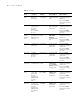
Null
interface
view
Configure null
interface
parameters
[SW7750-NULL0
]
Execute the
interface null 0
command in
system view.
Execute the quit
command to return to
system view.
Execute the return
command to return to
user view.
Tunnel
interface
view
Configure
tunnel
interface
parameters
[SW7750-Tunne
l0]
Execute the
interface tunnel 0
command in
system view.
Execute the quit
command to return to
system view.
Execute the return
command to return to
user view.
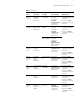
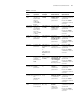
AUX
inter
face
view
Configure AUX
interface
parameters
[SW7750
-Aux0/0/0]
Execute the
interface aux
0/0/0 command in
system view.
Execute the quit
command to return to
system view.
Execute the return
command to return to
user view.
VLAN view Configure
VLAN
parameters
[SW7750-vlan1] Execute the vlan 1
command in
system view.
Execute the quit
command to return to
system view.
Execute the return
command to return to
user view.
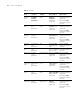
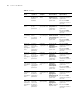
VLAN
interface
view
Configure IP
interface
parameters for
VLANs
[SW7750-Vlan-i
nterface1]
Execute the
interface
vlan-interface 1
command in
system view.
Execute the quit
command to return to
system view.
Execute the return
command to return to
user view.
Table 4 CLI views
View
Available
operation
Prompt
example Enter method Quit method