
3Com Switch 7750 Configuration Guide Guide

786 CHAPTER 73: BOOTROM AND HOST SOFTWARE LOADING
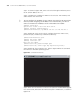
Step 5: Press <Enter>. The system displays the following information:
Are you sure you want update Fabric bootrom?Yes or No(Y/N)
Step 6: Enter Y to start file downloading or N to return to the Bootrom update
menu. If you enter Y, the system begins to download and update the BootROM
software. Upon completion, the system displays the following information:
Prepare for loading...OK!
Loading........................................done
Bootrom updating..........done!
Loading host software
Follow these steps to load the host software.
Step 1: Select <1> in Boot Menu and press <Enter>. The system displays the
following information:
1. Set TFTP protocol parameter
2. Set FTP protocol parameter
3. Set XMODEM protocol parameter
0. Return to boot menu
Enter your choice(0-3):3
Step 2: Enter 1 in the above menu to download the host software using TFTP.
The subsequent steps are the same as those for loading the BootROM program,
except that the system gives the prompt for host software loading instead of
BootROM loading.
c
CAUTION: When loading BootROM and host software using Boot menu, you are
recommended to use the PC directly connected to the device as TFTP server to
promote upgrading reliability.
Loading Software Using
FTP through Ethernet
Port
Introduction to FTP
FTP is an application-layer protocol in the TCP/IP protocol suite. It is used for file
transfer between server and client, and is widely used in IP networks.
You can use the switch as an FTP client or a server, and download software to the
switch through an Ethernet port. The following is an example.
Loading Process Using FTP Client
■ Loading BootROM software
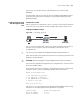
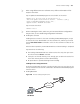
Figure 206 Local loading using FTP client
FTP client
Switch
PC
Console port Ethernet port
FTP server
Switch
PC
Console port Ethernet port
Switch
PC
Console port Ethernet port
Switch
PC
Console port Ethernet port
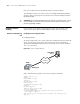
FTP client
Switch
PC
Console port Ethernet port
FTP server
Switch
PC
Console port Ethernet port
Switch
PC
Console port Ethernet port
Switch
PC
Console port Ethernet port