
3Com Switch 7750 Configuration Guide Guide



510 CHAPTER 48: AAA & RADIUS & HWTACACS CONFIGURATION
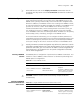
In an environment with a CAMS server, if the switch reboots after an exclusive user
(a user whose concurrent online number is set to 1 on the CAMS) gets
authenticated and authorized and begins being charged, the switch will give a
prompt that the user has already been online when the user re-logs in to the
network before CAMS performs online user detection, and the user cannot get
authenticated. In this case, the user can access the network again only after the
CAMS administrator manually removes the online information of the user.
The user re-authentication upon device restart function is designed to resolve the
above problem. After this function is enabled, every time the switch restarts:
1 The switch generates an Accounting-On packet, which mainly contains the
following information: NAS-ID, NAS-IP address (source IP address), and session ID.
2 The switch sends the Accounting-On packet to CAMS at regular intervals.
3 Once the CAMS receives the Accounting-On packet, it sends a response to the
switch. At the same time it finds and deletes the original online information of the
users who access the network through the switch before the restart according to
the information contained in this packet (NAS-ID, NAS-IP address and session ID),
and ends the accounting of the users based on the last accounting update packet.
4 Once the switch receives the response from the CAMS, it stops sending other
Accounting-On packets.
5 If the switch does not receives any response from the CAMS after the number of
the Accounting-On packets it has sent reaches the configured maximum number,
it does not send any more Accounting-On packets.
n
The switch can automatically generate the main attributes (NAS-ID, NAS-IP
address and session ID) in the Accounting-On packets. However, you can also
manually configure the NAS-IP address with the nas-ip command. If you choose
to manually configure the attribute, be sure to configure an appropriate and legal
IP address. If this attribute is not configured, the switch will automatically use the
IP address of the VLAN interface as the NAS-IP address.
HWTACACS
Configuration
Creating a HWTACACS
Scheme
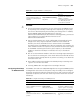
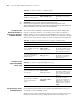
HWTACACS protocol is configured scheme by scheme. Therefore, you must create
a HWTACACS scheme and enter HWTACACS view before you perform other
configuration tasks.
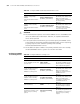
Tabl e 392 Enable the user re-authentication upon device restart function
Operation Command Description
Enter system view system-view -
Enter RADIUS scheme view
radius scheme
radius-scheme-name
-
Enable the user
re-authentication upon device
restart function
accounting-on enable [
send times | interval interval
]
By default, this function is
disabled, and the system can
send at most 15
Accounting-On packets
consecutively at intervals of
three seconds.