
3Com Switch 7750 Configuration Guide Guide


238 CHAPTER 29: MSTP CONFIGURATION
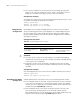
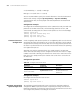
Configuration procedure (in Ethernet port view)
On a switch with BPDU protection not enabled, an edge port becomes a non-edge
port again once it receives a BPDU from another port.
n
You are recommended to configure the Ethernet ports connected directly to
terminals as edge ports and enable the BPDU protection function as well. This not
only enables these ports to transit to forwarding state rapidly but also secures your
network.
Configuration example
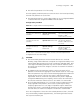
# Configure port Ethernet1/0/1 as an edge port.
1 Configure in system view.
<SW7750> system-view
[SW7750] stp interface ethernet1/0/1 edged-port enable
2 Configure in Ethernet port view.
<SW7750> system-view
[SW7750] interface ethernet1/0/1
[SW7750-Ethernet1/0/1] stp edged-port enable
Point-to-point
Link-Related
Configuration
A point-to-point link directly connects two switches. If the roles of the two ports at
the two ends of a point-to-point link meet certain criteria, the two ports can
transit to the forwarding state rapidly by exchanging synchronization packets,
eliminating the forwarding delay.
You can specify whether or not the link connected to a port is a point-to-point link
in one of the following two ways.
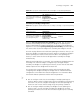
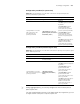
Configure the specified ports
as edge ports
stp interface interface-list
edged-port enable
Required
By default, all the Ethernet
ports of a switch are
non-edge ports.
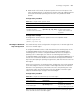
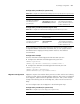
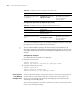
Tabl e 167 Configure a port as an edge port (in Ethernet port view)
Operation Command Description
Enter system view system-view -
Enter Ethernet port view
interface interface-type
interface-number
-
Configure the port as an edge
port
stp edged-port enable
Required
By default, all the Ethernet
ports of a switch are
non-edge ports.
Table 166 Configure a port as an edge port (in system view)
Operation Command Description