
3Com Switch 4200G Configuration Guide


Controlling Network Management Users by Source IP Addresses 37
Controlling
Network
Management
Users by Source
IP Addresses
You can manage a S4200G series Ethernet switch through network management
software. Network management users can access switches through SNMP.
You need to perform the following two operations to control network management
users by source IP addresses.
■ Defining an ACL
■ Applying the ACL to control users accessing the switch through SNMP
Prerequisites The controlling policy against network management users is determined, including
the source IP addresses to be controlled and the controlling actions (permitting or
denying).
Controlling Network
Management Users
by Source IP
Addresses
Controlling network management users by source IP addresses is achieved by
applying basic ACLs, which are numbered from 2000 to 2999.
You can specify different ACLs while configuring the SNMP community name, the
SNMP group name and the SNMP user name.
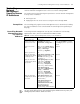
Table 27 Control network management users by source IP addresses
Operation Command Description
Enter system view system-view
Create a basic ACL or
enter basic ACL view
acl number acl-number [
match-order { config | auto }]
As for the acl number command,
the config keyword is specified by
default.
Define rules for the
ACL
rule [ rule-id ] { permit | deny } [
source { sour-addr sour-wildcard
| any }] [ time-range
time-name ] [ fragment ]
Required
Quit to system view quit
Apply the ACL while
configuring the SNMP
community name
snmp-agent community { read
| write } community-name [ [
mib-view view-name ] | [ acl
acl-number ] ]*
Optional
Apply the ACL while
configuring the SNMP
group name
snmp-agent group { v1 | v2c }
group-name [ read-view
read-view ] [ write-view
write-view ] [ notify-view
notify-view ] [ acl acl-number ]
snmp-agent group v3
group-name [ authentication |
privacy ] [ read-view
read-view ] [ write-view
write-view ] [ notify-view
notify-view ] [ acl acl-number ]
Optional
Apply the ACL while
configuring the SNMP
user name
snmp-agent usm-user { v1 |
v2c } user-name group-name [
acl acl-number ]
snmp-agent usm-user v3
user-name group-name [
authentication-mode { md5 |
sha } auth-password ] [
privacy-mode des56
priv-password ] [ acl acl-number ]
Optional