
3Com Switch 4200G Configuration Guide

386 CHAPTER 45: CONFIGURATION OF NEWLY ADDED CLUSTER FUNCTIONS
Configuring Cluster
Interoperation
After creating a cluster, you can universally configure servers, NMS hosts and logging
hosts for the cluster on the management device. Member devices can access the
configured servers through the management device.
All the log information of the member devices in the cluster is output to the
configuration logging hosts. The member devices send the log information to the
management device directly. The management device translates the addresses
contained in the logs, and then sends log packets of the member devices to logging
hosts of the cluster. Likely, all the trap packets of the member devices are sent to NMS
hosts of the cluster.
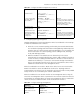
Release a device from the
blacklist
black-list
delete-mac { all |
mac-address }
Optional
Confirm the current
topology information of the
cluster and save that as a
standard topology
topology accept { all [
save-to { administrator |
local-flash } ] |
mac-address mac-address |
member-id member-number }
Optional
Save the standard topology
information into the local
flash
topology save-to
local-flash
Optional
Obtain and restore the
standard topology
information from the local
flash
topology restore-from
local-flash
Optional
If the saved standard
topology is incorrect, the
management device cannot
accept it, so you must ensure
that the saved topology is
correct
Table 332 Configure topology management (Continued)
Operation Command Description
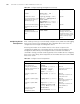
Table 333 Configure cluster interoperation
Operation Command Description
Enter system view system-view -
Enter cluster view cluster -
Configure the IP address,
username and password of a
public FTP server
ftp-server ip-address [
user-name username
password { simple |
cipher } password ]
Optional
By default, a cluster has no
public FTP server
Configure a public TFTP
server
tftp-server ip-address Optional
By default, a cluster has no
public TFTP server
Configure a public logging
host
logging-host ip-address Optional
By default, a cluster has no
public logging host
Configure a public SNMP
host
snmp-host ip-address [
community-string read
string1 write string2 ]
Optional
By default, a cluster has no
public SNMP host
Configuring an NMS
interface for the
management device
nm-interface
vlan-interface vlan-id
Optional