
3Com Switch 4200G Configuration Guide

384 CHAPTER 45: CONFIGURATION OF NEWLY ADDED CLUSTER FUNCTIONS
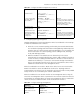
#
radius scheme system
#
domain system
#
vlan 1
#
snmp-agent
snmp-agent local-engineid 800007DB000FE224055F6877
snmp-agent community read aaa@cm2
snmp-agent community write bbb@cm2
snmp-agent sys-info version all
snmp-agent group v3 ggg
snmp-agent target-host trap address udp-domain 168.192.0.1 params
securityname
cluster
snmp-agent mib-view included mmm org
snmp-agent usm-user v3 uuu ggg
snmp-agent usm-user v3 user1 g1
snmp-agent trap source Vlan-interface1
#
Configuring Cluster
Management
■ Configuring member management
In member management, you can:
■ Specify a candidate device that will join the cluster and delete the specific
member device in the cluster manually. You are allowed to add or delete a
cluster member only on the management device; otherwise the system gives an
error prompt.
■ Control the member device remotely through the remote control function of
the management device if a member device fails due to incorrect
configuration. For example, you can delete the boot file and restart the
member device to bring the management device and the member device back
to normal communication.
■ Manage blacklists.
■ Locate a device through the MAC address or the IP address.
■ Configure the specified member device on the management device after
switching to the member device view. After the configuration, you can switch
back to the management device.
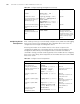
Table 331 Configure member management
Operation Command Description
Enter system view system-view -
Enter cluster view cluster -
Add a candidate device
to the cluster
add-member [ member-number
] mac-address mac-address
[ password password ]
Optional
Member numbers are assigned
based on a certain order. The
number that the member with the
same MAC address used is
recorded by the management
device
Delete a member
device from the cluster
delete-member
member-number [
to-black-list ]
Optional