
3Com Switch 4200G Configuration Guide

Overview of IGMP Snooping 251
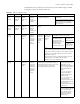
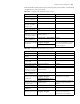
To implement Layer 2 multicast, the switch processes four different types of IGMP
messages it received, as shown in Table 221.
Table 221 IGMP Snooping messages
Message Sender Receiver Purpose Switch action
IGMP general
query
message
Multicast
router and
multicast
switch
Multicast
member
switch and
host
Query if the
multicast
groups
contain any
member
Check if the message comes from
the original router port
If yes, reset the aging timer of the
router port.
If not, notify the multicast router
that a member is in a multicast
group and start the aging timer for
the router port.
IGMP
group-specifi
c query
message
Multicast
router and
multicast
switch
Multicast
member
switch and
host
Query if a
specific
multicast
group
contains any
member
Send a group-specific query message to the IP multicast group being
queried.
IGMP host
report
message
Host Multicast
router and
multicast
switch
Apply for
joining a
multicast
group, or
respond to
an IGMP
query
message
Check if the
IP multicast
group has a
correspondi
ng MAC
multicast
group
If yes, check if
the port exists
in the MAC
multicast
group.
If yes, add the IP multicast group address
to the MAC multicast group table.
If not, add the port to
the MAC multicast
group, trigger the
aging timer of the port
and check if the
corresponding IP
multicast group exists.
If yes, add the
port to the IP
multicast group.
If not, create an
IP multicast
group and add
the port to it.
If not:
Create a MAC multicast group and notify the multicast
router that a member is ready to join the multicast group.
Add the port to the MAC multicast group and start the
aging timer of the port.
Add all router ports in the VLAN owning this port to the
forward port list of the MAC multicast group.
Add the port to the IP multicast group.
IGMP leave
message
Host Multicast
router and
multicast
switch
Notify the
multicast
router and
multicast
switch that
the host is
leaving its
multicast
group.
Multicast router and multicast switch send
group-specific query packet(s) to the port
receiving the leave message to check if the
port has any member, and start the
corresponding query response timer.
If no response is received
from the port before the
timer times out, the
switch will check whether
the port corresponds to a
single MAC multicast
group.
If yes, remove the
corresponding MAC
multicast group and IP
multicast group.
If no, remove only
those entries that
correspond to this port in
the MAC multicast group,
and remove the
corresponding IP multicast
group entries.
If no response is received
from the multicast group
before the timer times
out, notify the router to
remove this multicast
group node from the
multicast tree.