
3Com Switch 4200G Configuration Guide

240 CHAPTER 28: CONFIGURATION FOR MIRRORING FEATURES
Configuration procedure
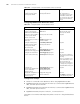
acl-rule: applied ACL rules, which can be the combination of different types of ACL
rules. Table 209 describes the ACL combinations.
Configuration example
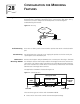
■ GigabitEthernet1/0/1 on the switch is connected to the 10.1.1.1/24 network
segment.
■ Mirror the packets from the 10.1.1.1/24 network segment to
GigabitEthernet1/0/7, the destination port.
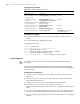
Configuration procedure:
<S4200G> system-view
System View: return to User View with Ctrl+Z.
[4200G] acl number 2000
[4200G-acl-basic-2000] rule permit source 10.1.1.1 0.0.0.255
[4200G-acl-basic-2000] rule deny source any
[4200G-acl-basic-2000] quit
[4200G] interface gigabitEthernet1/0/7
[4200G-GigabitEthernet1/0/7] monitor-port
[4200G-GigabitEthernet1/0/7] quit
[4200G] interface gigabitEthernet1/0/1
[4200G-GigabitEthernet1/0/1] mirrored-to inbound ip-group 2000
monitor-interface
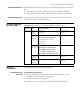
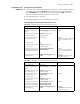
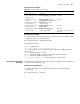
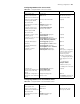
Table 208 Configure traffic mirroring
Operation Command Description
Enter system view system-view -
Enter Ethernet port view of
the destination port
interface interface-type
interface-number
-
Define the current port as
the destination port
monitor-port Required
Exit current view quit -
Enter Ethernet port view of
traffic mirroring
configuration
interface interface-type
interface-number
-
Reference ACLs for
identifying traffic flows and
perform traffic mirroring
for packets that match.
mirrored-to inbound acl-rule
monitor-interface
Required
Display the parameter
settings of traffic mirroring
display qos-interface
{ interface-type interface-num |
unit-id } mirrored-to
Optional
The display command can be
executed in any view
Display all QoS settings of a
port
display qos-interface
{ interface-type interface-num |
unit-id } all
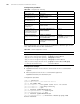
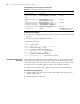
Table 209 Combined application of ACLs
Combination mode Form of acl-rule
Apply all rules in an IP type ACL separately ip-group acl-number
Apply one rule in an IP type ACL separately ip-group acl-number rule rule
Apply all rules in a Link type ACL separately link-group acl-number
Apply one rule in a Link type ACL separately link-group acl-number rule rule
Apply one rule in an IP type ACL and one rule
in a Link type ACL simultaneously
ip-group acl-number rule rule link-group
acl-number rule rule