
3Com Switch 4200G Configuration Guide

232 CHAPTER 27: QOS CONFIGURATION
Configuration Procedure
of the SDWRR Queue
Scheduling
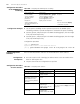
Configuration Example
■ Set the queue-scheduling mode of queue0 to queue5 to the SDWRR queue
scheduling, and that of queue6 and queue7 to the default SP queue scheduling
■ Queue3, queue4, and queue5 join in the WRR scheduling group1, with the weight
of 20, 20, and 30 respectively
■ Queue0, queue1, and queue2 join in the WRR scheduling group2, with the weight
of 20, 20, and 40 respectively
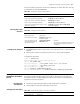
Configuration procedure:
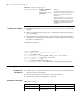
<S4200G> system-view
System View: return to User View with Ctrl+Z.
[4200G] queue-scheduler wrr group1 3 20 4 20 5 30 group2 0 20 1 20 2 40
Configuring Traffic
Statistics
Refer to Traffic-based Traffic Statistics for the introduction to traffic statistics.
Configuration
Prerequisites
■ ACL rules used for traffic identifying are defined. Refer to the ACL module in the
book for defining ACL rules
■ The ports that needs this configuration are specified
Configuration Procedure
of Traffic Statistics
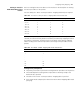
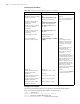
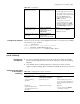
Table 200 Configuring the SDWRR queue scheduling
Operation Command Description
Enter system view system-view -
Set the SDWRR
queue-scheduling
algorithm and its
parameters
queue-scheduler wrr { group1
{ queue-id queue-weight }
&<1-8> | group2 { queue-id
queue-weight } &<1-8> }*
Required
Display the
queue-scheduling mode
and related parameters on
the switch
display queue-scheduler Optional
You can execute the display
command in any view
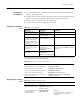
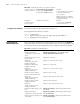
Table 201 Configuring traffic statistics
Operation Command Description
Enter system view system-view -
Enter Ethernet port view interface interface-type
interface-number
-
Use the ACL rules in traffic
identifying and perform
traffic statistics on the
packets matching with the
ACL rules.
traffic-statistic inbound
acl-rule
Required
Display the traffic statistics. display qos-interface
{ interface-type
interface-num | unit-id }
traffic-statistic
Optional
You can execute the display command
in any view
Display all the QoS settings
of the port
display qos-interface
{ interface-type
interface-num | unit-id } all