
3Com Switch 4200G Configuration Guide

AAA&RADIUS Configuration Example 187
AAA&RADIUS
Configuration
Example
Remote RADIUS
Authentication of
Telnet/SSH Users
The configuration procedure for the remote authentication of SSH users through
RADIUS server is similar to that of Telnet users. The following description only takes
the remote authentication of Telnet users as example
Network requirements
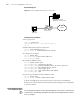
In the network environment shown in Figure 58, you are required to configure the
switch so that the Telnet users logging into the switch are authenticated by the
RADIUS server.
■ A RADIUS server with IP address 10.110.91.164 is connected to the switch. This
server will be used as the authentication server.
■ On the switch, set the shared key it uses to exchange packets with the
authentication RADIUS server to “expert”.
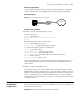
You can use a CAMS server as the RADIUS server. If you use a third-party RADIUS
server, you can select standard or 3Com as the server type in the RADIUS scheme.
On the RADIUS server:
■ Set the shared key it uses to exchange packets with the switch to “expert”.
■ Set the port number for authentication.
■ Add Telnet user names and login passwords.
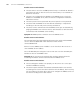
The Telnet user name added to the RADIUS server must be in the format of
userid@isp-name if you have configure the switch to include domain names in the
user names to be sent to the RADIUS server.
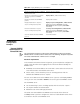
Table 155 Display RADIUS protocol information
Operation Command
Display the statistics about local RADIUS
authentication server
display local-server statistics
Display the configuration information
about one specific or all RADIUS
schemes
display radius [ radius-scheme-name ]
Display the statistics about RADIUS
packets
display radius statistics
Display the buffered no-response
stop-accounting request packets
display stop-accounting-buffer { radius-scheme
radius-server-name | session-id session-id |
time-range start-time stop-time | user-name
user-name }
Delete the buffered no-response
stop-accounting request packets
reset stop-accounting-buffer { radius-scheme
radius-server-name | session-id session-id |
time-range start-time stop-time | user-name
user-name }
Clear the statistics about the RADIUS
protocol
reset radius statistics