
3Com Switch 4200G Configuration Guide

180 CHAPTER 23: AAA&RADIUS CONFIGURATION
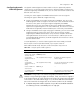
Configuring RADIUS
Authentication/Auth
orization Servers
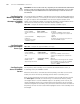
CAUTION:
■ The authentication response sent from the RADIUS server to the RADIUS client
carries the authorization information. Therefore, no separate authorization server
can be specified.
■ In an actual network environment, you can either specify two RADIUS servers as
the primary and secondary authentication/authorization servers respectively, or
specify only one server as both the primary and secondary
authentication/authorization servers.
■ The IP address and port number of the primary authentication server used by the
default RADIUS scheme “system” are 127.0.0.1 and 1645.
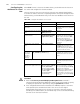
Configuring RADIUS
Accounting Servers
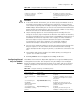
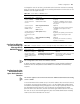
Table 143 Configure RADIUS authentication/authorization server
Operation Command Description
Enter system view system-view —
Create a RADIUS scheme and enter
its view
radius scheme
radius-scheme-name
Required
By default, a RADIUS scheme
named “system” has already been
created in the system.
Set the IP address and port number
of the primary RADIUS
authentication/authorization server
primary
authentication
ip-address [
port-number ]
Required
By default, the IP address and UDP
port number of the primary server
are 0.0.0.0 and 1812 respectively.
Set the IP address and port number
of the secondary RADIUS
authentication/authorization server
secondary
authentication
ip-address [
port-number ]
Optional
By default, the IP address and UDP
port number of the secondary
server are 0.0.0.0 and 1812
respectively.
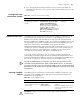
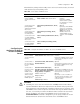
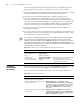
Table 144 Configure RADIUS accounting server
Operation Command Description
Enter system view system-view —
Create a RADIUS
scheme and enter its
view
radius scheme
radius-scheme-name
Required
By default, a RADIUS scheme named
“system” has already been created in
the system.
Set the IP address and
port number of the
primary RADIUS
accounting server
primary accounting
ip-address [ port-number ]
Required
By default, the IP address and UDP port
number of the primary accounting
server are 0.0.0.0 and 1813.
Set the IP address and
port number of the
secondary RADIUS
accounting server
secondary accounting
ip-address [ port-number ]
Optional
By default, the IP address and UDP port
number of the secondary accounting
server are 0.0.0.0 and 1813.
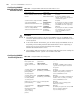
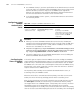
Enable stop-accounting
packet buffering
stop-accounting-buffer
enable
Optional
By default, stop-accounting packet
buffering is enabled.
Set the maximum
number of
transmission attempts
of the buffered
stop-accounting
packets.
retry stop-accounting
retry-times
Optional
By default, the system tries at most 500
times to transmit a buffered
stop-accounting request.