
3Com Switch 4200G Configuration Guide

Leaf Node Configuration 131
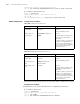
■ Configure in Ethernet port view.
<S4200G> system-view
System View: return to User View with Ctrl+Z.
[4200G] stp enable
[4200G] interface GigabitEthernet1/0/1
[4200G-GigabitEthernet1/0/1] stp disable
Leaf Node
Configuration
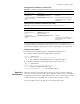
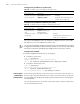
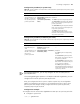
Table 102 lists MSTP-related configurations about leaf nodes.
In a network that contains switches with both GVRP and MSTP employed, GVRP
packets are forwarded along the CIST. If you want to broadcast packets of a specific
VLAN through GVRP, be sure to map the VLAN to the CIST when configuring the
MSTP VLAN mapping table (The CIST of a network is the spanning tree instance
numbered 0.)
Prerequisites The status of the switches in the spanning trees is determined. That is, the status
(root, branch, or leaf) of each switch in each spanning tree instance is determined.
MST Region
Configuration
Refer to “MST Region Configuration”.
MSTP Operation Mode
Configuration
Refer to “MSTP Operation Mode Configuration”.
Timeout Time Factor
Configuration
Refer to “Timeout Time Factor Configuration”.
Table 102 Leaf node configuration
Operation Description Related section
MSTP configuration Required
To prevent network topology jitter
caused by other related
configurations, you are
recommended to enable MSTP after
performing other configurations.
MSTP Configuration
MST region
configuration
Required MST Region Configuration
MSTP operation
mode configuration
Optional MSTP Operation Mode
Configuration
Timeout time factor
configuration
Optional Timeout Time Factor Configuration
Maximum
transmitting speed
configuration
Optional
The default is recommended.
Maximum Transmitting Speed
Configuration
Edge port
configuration
Optional Edge Port Configuration
Path cost
configuration
Optional Path Cost Configuration
Port priority
configuration
Optional Port Priority Configuration
Point-to-point link
related configuration
Optional Point-to-point Link-Related
Configuration