
3Com Switch 4200G Configuration Guide

126 CHAPTER 20: MSTP CONFIGURATION
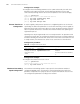
Configuration example
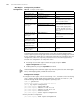
1 Configure the Forward delay parameter to be 1,600 centiseconds, the Hello time
parameter to be 300 centiseconds, and the Max age parameter to be 2,100
centiseconds (assuming that the current switch operates as the CIST root bridge).
<S4200G> system-view
System View: return to User View with Ctrl+Z.
[4200G] stp timer forward-delay 1600
[4200G] stp timer hello 300
[4200G] stp timer max-age 2100
Timeout Time Factor
Configuration
A switch regularly sends protocol packets to its neighboring devices at the interval
specified by the Hello time parameter to test the links. Normally, a switch regards its
upstream switch faulty if the former does not receive any protocol packets from the
latter in a period three times of the Hello time and then initiates the spanning tree
regeneration process.
Spanning trees may be regenerated even in a steady network if an upstream switch
continues to be busy. You can configure the timeout time factor to a larger number to
avoid this. Normally, the timeout time can be four or more times of the Hello time. For
a steady network, the timeout time can be five to seven times of the Hello time.
Configuration procedure
Configuration example
1 Configure the timeout time factor to be 6.
<S4200G> system-view
System View: return to User View with Ctrl+Z.
[4200G] stp timer-factor 6
Maximum Transmitting
Speed Configuration
The maximum transmitting speed of a port specifies the maximum number of
configuration BPDUs a port can transmit in a period specified by the Hello time
parameter. It depends on the physical state of the port and network structure. You
can configure this parameter according to the network.
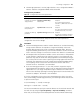
Table 93 Configure timeout time factor
Operation Command Description
Enter system view system-view —
Configure the timeout
time factor for the
switch
stp timer-factor number Required
The timeout time factor defaults to
3.