
3Com Switch 4200G Configuration Guide

Root Bridge Configuration 125
■ The Max age parameter is used to judge whether or not a configuration BPDU is
obsolete. Obsolete configuration BPDUs will be discarded.
Configuration procedure
All switches in a switched network adopt the three time-related parameters
configured on the CIST root bridge.
CAUTION:
■ The Forward delay parameter and the network diameter are correlated. Normally,
a large network diameter corresponds to a large Forward delay. A too small
Forward delay parameter may result in temporary redundant paths. And a too
large Forward delay parameter may cause a network unable to resume the normal
state in time after changes occurred to the network. The default is recommended.
■ An adequate Hello time parameter enables a switch to be aware of link problems
in time without occupying too much network resources. A too large Hello time
parameter may result in normal links being regarded as invalid when packets get
lost on them, which in turn results in spanning trees being regenerated. And a too
small Hello time parameter may result in duplicated configuration BPDUs being
sent frequently, which increases the work load of the switches and wastes
network resources. The default is recommended.
■ As for the Max age parameter, if it is too small, network congestions may be
falsely regarded as link problems, which results in spanning trees being frequently
regenerated. If it is too large, link problems may be unable to be found in time,
which in turn handicaps spanning trees being regenerated in time and makes the
network less adaptive. The default is recommended.
As for the configuration of these three time-related parameters (that is, the Hello
time, Forward delay, and Max age parameters), the following formulas must be met
to prevent network jitter.
2 x (Forward delay – 1 second) >= Max age
Max age >= 2 x (Hello time + 1 second)
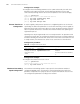
You are recommended to specify the network diameter of the switched network and
the Hello time by using the stp root primary or stp root secondary command.
After that, the three proper time-related parameters are determined automatically.
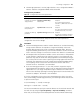
Table 92 Configure MSTP time-related parameters
Operation Command Description
Enter system view system-view —
Configure the Forward
delay parameter
stp timer forward-delay
centiseconds
Required
The Forward delay parameter
defaults to 1,500 centiseconds (15
seconds).
Configure the Hello
time parameter
stp timer hello centiseconds Required
The Hello time parameter defaults
to 200 centiseconds (2 seconds).
Configure the Max age
parameter
stp timer max-age centiseconds Required
The Max age parameter defaults to
2,000 centiseconds (20 seconds).