
3Com Switch 4200G Configuration Guide


106 CHAPTER 19: LOGGING IN THROUGH TELNET
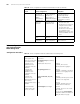
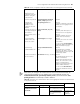
Set the maximum number of
lines the screen can contain
screen-length
screen-length
Optional
By default, the screen can contain
up to 24 lines.
You can use the screen-length 0
command to disable the function
to display information in pages.
Set history command buffer
size
history-command
max-size value
Optional
The default history command
buffer size is 10. That is, a history
command buffer can store up to 10
commands by default.
Set the timeout time for the
user interface
idle-timeout minutes [
seconds ]
Optional
The default timeout time of a user
interface is 10 minutes.
With the timeout time being 10
minutes, the connection to a user
interface is terminated if no
operation is performed in the user
interface within 10 minutes.
You can use the idle-timeout 0
command to disable the timeout
function.
Table 81 Telnet configuration with the authentication mode being scheme (Continued)
Operation Command Description