
3Com Switch 4200G Configuration Guide


Telnet Configuration with Authentication Mode Being None 101
Note that if you configure not to authenticate the users, the command level available
to users logging into a switch depends on both the authentication-mode
{ password | scheme | none } command and the user privilege level level
command, as listed in Table 78.
Configuration
Example
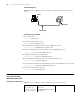
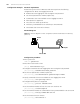
Network requirements
Assume that you are a level 3 AUX user and want to perform the following
configuration for Telnet users logging into VTY 0:
Do not authenticate users logging into VTY 0.
Commands of level 2 are available to users logging into VTY 0.
Telnet protocol is supported.
The screen can contain up to 30 lines.
The history command buffer can contain up to 20 commands.
The timeout time of VTY 0 is 6 minutes.
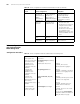
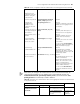
Set the history
command buffer size
history-command max-size
value
Optional
The default history command buffer
size is 10. That is, a history
command buffer can store up to 10
commands by default.
Set the timeout time of
the VTY user interface
idle-timeout minutes [ seconds ] Optional
The default timeout time of a user
interface is 10 minutes.
With the timeout time being 10
minutes, the connection to a user
interface is terminated if no
operation is performed in the user
interface within 10 minutes.
You can use the idle-timeout 0
command to disable the timeout
function.
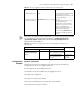
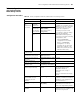
Table 78 Determine the command level when users logging into switches are not
authenticated
Scenario Command level
Authentication mode User type Command
None
(authentication-mode
none)
VTY users The user privilege level
level command not executed
Level 0
The user privilege level
level command already
executed
Determined by
the level
argument
Table 77 Telnet configuration with the authentication mode being none
Operation Command Description