Removal and replacement procedures 61
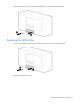
2. Remove the 10mm screw that secures the VESDA filter (1), and then remove the filter (2).
Replacing the VESDA filter
1. Insert the new VESDA filter (1), and then replace the 10mm screw that secures the filter (2).
2. Replace the VESDA filter cover.