
NC51xx PCIe 10 Gigabit Server Adapter Software and Configuration Guide


Installation and configuration 8
Command Definition Description
-a, --all Update all of
firmware
Updates the flash memory using
appropriate romimage file. The tool
determines which rom image file to
use.
-r, --restore <image
file>
Restore flash
memory
Restores flash memory using backup
romimage. The romimage is
contained in the image file.
--opt-rom-on Enable
expansion
ROM
Enables the adapter's PXE
functionality.
--opt-rom-off Disable
expansion
ROM
Disables the adapter's PXE
functionality.
-h, --help help Displays the help menu.
-v, --version Version Displays the nxflash utility's version
information
Verifying the Windows installation
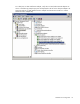
To verify the HP NC51xx 10 Gigabit Ethernet adapter driver was properly installed:
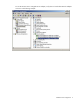
1. On the desktop, click Start and select Settings > Control Panel > Administrative Tools > Computer
Management to display the Computer Management window.
2. Click Device Manager and then scroll down the list of hardware devices to Network Adapters and
click the plus (+). This expands the list of adapters currently configured.