
NC51xx PCIe 10 Gigabit Server Adapter Software and Configuration Guide
Linux Socket Acceleration 24
9.
Install the source RPM package.
# rpm -ivh nx_lsa-<version>.src.rpm
10. Build the binary RPM for the nx_lsa package.
Red Hat Installation:
# cd /usr/src/redhat
# rpmbuild -bb SPECS/nx_lsa-<version>.spec
SLES 9/10 Installation:
# cd /usr/src/packages
# rpmbuild -bb SPECS/nx_lsa-<version>.spec
If you get an error during the build process, see Setting up the kernel source code (on page 16) for
information to configure the source tree correctly.
11. Install the new RPM package.
# rpm -ivh RPMS/<arch>/nx_lsa-<version>.<arch>.rpm
The drivers is installed in the following path:
/lib/modules/<kernel_version>/kernel/drivers/net/nx_lsa.ko
/lib/modules/<kernel_version>/kernel/drivers/net/nx_intercept.ko
The nxoffload utility is installed in the following path:
/usr/local/bin/nxoffload
12. Reboot the server. The network should start with the nx_lsa and nx_intercept drivers loaded.
13. Use the following command to verify that the drivers are loaded.
# lsmod
If the drivers are not loaded, load them with modprobe command.
# modprobe nx_intercept
# modprobe nx_lsa
The nx_lsa requires the nx_intercept driver to be loaded.
14. Use the ifconfig command to bring up the network.
# ifconfig eth# up
The LSA Intercept driver must be running in order for the LSA driver to function properly. When the server
is rebooted and before using the LSA driver, use the lsmod command to ensure that the NC51xx network
adapter and Intercept driver are running.
LSA driver configuration
The LSA driver can be configured using the nxoffload utility. This utility works by maintaining a list of rules
that dictate which applications to offload.
Each rule can take one of the following parameters:
• Application name
• Local TCP port number
• Local and remote TCP port number
LSA driver configuration options
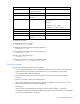
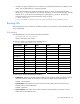
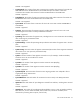
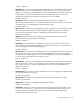
The following table provides LSA driver configuration usage options for the nxoffload utility (nxoffload
<command>).