
NC51xx PCIe 10 Gigabit Server Adapter Software and Configuration Guide
Installation and configuration 20
o
Range: Disable (0) or Enable (1)
Example: The following command illustrates how to use the modprobe command to disable MSI with
the use_msi option.
# modprobe nx_nic use_msi=0
Driver message log
Messages are logged in the following file.
/var/log/messages
Some Linux distributions may not display messages to the console.
To set messages to display on the console, use the following command to control the level that messages
display on the console.
# dmesg -n x
The x is a variable representing the level. Most systems are set to level 6 by default.
For example, to set the system to level 6, type the following command:
# dmesg -n 6
Uninstalling the adapter driver
To uninstall the HP NC51xx PCIe 10 Gigabit Server Adapter driver software in Windows, perform the
following steps:
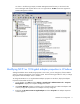
1. On the desktop, click Start and select Settings > Control Panel > Administrative Tools > Computer
Management to display the Computer Management window.
2. Click Device Manager and then scroll down the list of hardware devices to Network Adapters and
click the plus (+). This expands the list of adapters currently configured. For example, HP NC510x
PCle 10 Gigabit Server Adapter is listed in the example above and is removed with the following
step.
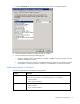
3. Right-click HP NC510x PCIe 10 Gigabit Server Adapter and select Uninstall.
To uninstall dual port 10GbE adapter driver software in Windows, perform the following steps:
1. On the desktop, click Start and select Settings > Control Panel > Administrative Tools > Computer
Management to display the Computer Management window.
2. Click Device Manager and then scroll down the list of hardware devices to Network Adapters and
click the plus (+). This expands the list of adapters currently configured.
3. Locate the two ports listed under Network adapters.
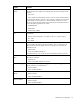
For example, HP NC 512m Dual Port 10GbE Multifunction BL-c Adapter and HP NC 512m Dual
Port 10GbE Multifunction BL-c Adapter #2 are listed in the Computer Management window shown
above and are removed with the following steps.
4. Right-click HP NC 512m Dual Port 10GbE Multifunction BL-c Adapter and select Uninstall.
5. Right-click HP NC 512m Dual Port 10GbE Multifunction BL-c Adapter #2 and select Uninstall.
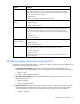
6. Locate the NetXen Management Interface listed under System devices in the Device Manager
display.
7. Right-click NetXen Management Interface and select Uninstall.