
NC51xx PCIe 10 Gigabit Server Adapter Software and Configuration Guide

Installation and configuration 18
Installing the nx_tools RPM
The nx_tools RPM contains the nxflash firmware upgrade tool and the nxudiag user diagnostic tool (see
Diagnostic utility (on page 32) for nxudiag functionality information). Complete the following steps to
install this RPM.
1. Check for the existence of a current version of the nx_tools package:
# rpm -q nx_tools
If an old version of the package exists, remove the RPM package:
# rpm -e nx_tools
Verify that the old nx_tools package has been removed:
# rpm -q nx_tools
2. Install the new nx_tools binary rpm.
# rpm -ivh nx_tools-<version>.rpm
The RPM contents will be installed in /opt/netxen.
Upgrading the firmware
1. Make sure that the nx_nic driver is loaded into the system before proceeding with the firmware
upgrade.
2. Change to the installation directory:
# cd /opt/netxen
3. Update the firmware and BIOS for the specified interface:
# ./nxflash -i eth<x> --all
4. Verify firmware and BIOS version:
# ./nxflash -i eth<x> --info
5. Reboot the system to use the new firmware.
Command line arguments
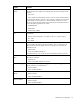
The HP NC51xx Online Firmware Upgrade Utility recognizes the following command line arguments. The
command and its arguments are case sensitive.
Command Definition Description
-i interface Specifies the interface type [eth0,
eth1, etc.]
--info information Displays board type, board chip
revision, serial ID, firmware version,
BIOS version, MAC address and
subsystem ID.
-a, --all Update all of
firmware
Burn flash memory using romimage
-r, --restore <image
file>
Restore flash
memory
Restore flash memory using backup
romimage. The romimage is
contained in the image file.
--opt-rom-on Enable
expansion
ROM
Enables the adapter's PXE
functionality.
--opt-rom-off Disable
expansion
ROM
Disables the adapter's PXE
functionality.
-h, --help help Displays the help menu.