
NC510F PCIe 10 Gigabit Server Adapter

Installing an adapter 10
5.
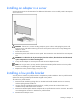
Orient the XFP module with the label side down and then reinstall the module all the way into its
socket until it clicks into place and latches securely.
Connecting the network cable
The HP NC510F PCI Express Multifunction Gigabit Server Adapter uses an LC fiber port. This port
supports multimode fiber with a maximum cable length dependent on the fiber type, mode, and cable
size. See Cable specifications (on page 11) for the maximum cable length.
To insert the LC connector into the adapter port, line up the slot on the fiber connector with the adapter
and gently push until the retainers click into place.