
R2511-HP MSR Router Series Voice Configuration Guide(V5)

36
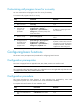
Step Command Remarks
3. Set the expected bandwidth
for the voice subscriber line.
bandwidth bandwidth-value
Optional.
Support for the command depends
on your device model.
4. Configure a voice
subscriber-line description.
description string
Optional.
By default, the description string of
a voice subscriber line is
interface-name+interface.
5. Restore the default
configuration of the voice
subscriber line.
default Optional.
6. Tear down the voice
subscriber line.
shutdown
Optional.
Up by default.
Configuring FXS voice subscriber line
This section covers prerequisites and procedures for configuring an FXS voice subscriber lines.
Configuration prerequisites
• The router is equipped with an applicable FXS interface card.
• The basic functions of FXS voice subscriber lines are configured.
Configuration guidelines
• To implement the CID function, the VoIP router must be capable to receive calling identity
information in the on-hook state, the hardware and software of PBX must support this service, and
the called telephone must be able to receive and display calling identity information (such
telephones are CID I or CID II class) in the on-hook or conversation state.
• The call date and time transmitted in data-message format is the router system time. To ensure
correct call time, use the clock command to synchronize router time with the local standard time.
Configuring CID
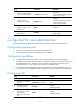
Step Command Remarks
1. Enter system view.
system-view N/A
2. Enter FXS voice subscriber
line view.
subscriber-line line-number N/A
3. Enable CID on the FXS
voice subscriber line.
cid display
Optional.
Enabled by default.
4. Enable the FXS voice
subscriber line to send
calling identity
information to the remote
end.
cid send
Optional.
Enabled by default.