
R2511-HP MSR Router Series Voice Configuration Guide(V5)

89
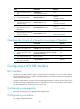
Step Command Remarks
3. Enable the AMD function.
amd enable
Disabled by default.
The AMD detection results are
subject to the language
characteristics, answering
machines, and background noises
and music.
NOTE:
Support for the AMD function depends on the voice card.
Configuring AMD parameters
The accuracy of AMD detection results depends on the settings of detection parameters. You can
increase the accuracy of the detection by adjusting AMD parameters.
To configure AMD parameters:
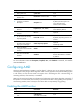
Step Command Remarks
1. Enter system view.
system-view N/A
2. Enter voice view.
voice-setup N/A
3. Configure AMD parameters.
amd parameter { machine-time
value | max-analyze-time value |
min-silence-time value |
valid-voice-time value |
voice-energy-threshold value }
Optional.
By default, the machine-time
keyword is 2600 milliseconds, the
max-analyze-time keyword is
4000 milliseconds, the
min-silence-time keyword is 800
milliseconds, the valid-voice-time
keyword is 120 milliseconds, the
voice-energy-threshold keyword is
100.
For more information about the
parameters, see Voice Command
Reference.
NOTE:
The execution of the amd parameter command in voice view is a global configuration, which means it will
be effective for the entire device.
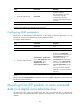
Mirroring PCM, RTP packets, or voice command
data on a digital voice subscriber line
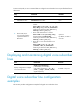
The mirroring function copies the specified PCM, RTP, and voice command data on a digital voice
subscriber line to the specified destination. With the mirroring function, you can analyze and locate
problems.