
R2511-HP MSR Router Series Layer 3 - IP Routing Command Reference(V5)
20
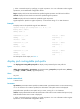
begin: Displays the first line that matches the specified regular expression and all lines that follow.
exclude: Displays all lines that do not match the specified regular expression.
include: Displays all lines that match the specified regular expression.
regular-expression: Specifies a regular expression, a case-sensitive string of 1 to 256 characters.
Examples
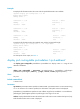
# Display brief active routing information permitted by the IPv6 prefix list test2.
<Sysname> display ipv6 routing-table ipv6-prefix test2
Routes Matched by Prefix list test2 :
Summary Count : 1
Destination: 100::/64 Protocol : Static
NextHop : :: Preference: 60
Interface : NULL0 Cost : 0
For descriptions of the output, see Table 4.
display ipv6 routing-table protocol
Use display ipv6 routing-table protocol to display IPv6 routes of a specified routing protocol.
Syntax
display ipv6 routing-table [ vpn-instance vpn-instance-name ] protocol protocol [ inactive | verbose ] [ |
{ begin | exclude | include } regular-expression ]
Views
Any view
Default command level
1: Monitor level
Parameters
vpn-instance vpn-instance-name: Specifies an MPLS L3VPN. vpn-instance-name is a case-sensitive string
of 1 to 31 characters. If no VPN is specified, the information of the public network is displayed.
protocol: Displays routes of a routing protocol, which can be bgp4+, direct, isisv6, ospfv3, ripng, or
static.
inactive: Displays only inactive routes. Without the keyword, all active and inactive routes are displayed.
verbose: Displays detailed information about both active and inactive routes. Without this keyword, only
brief information about active routes is displayed.
|: Filters command output by specifying a regular expression. For more information about regular
expressions, see Fundamentals Configuration Guide.
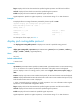
begin: Displays the first line that matches the specified regular expression and all lines that follow.
exclude: Displays all lines that do not match the specified regular expression.
include: Displays all lines that match the specified regular expression.
regular-expression: Specifies a regular expression, a case-sensitive string of 1 to 256 characters.