
R2511-HP MSR Router Series Fundamentals Configuration Guide(V5)



92
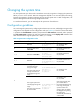
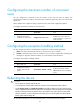
Scheduling a job by using the non-modular method
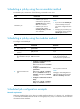
To schedule a job, execute one of the following commands in user view:
Task Command
Remarks
Schedule a job.
• Schedule a job to run a
command at a specific time:
schedule job at time [ date ]
view view command
•
Schedule a job to run a
command after a delay:
schedule job delay time view
view command
Use either command.
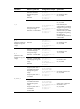
NOTE:
• If you execute the schedule job
command multiple times, the
most recent configuration takes
effect.
• Changing any clock setting can
cancel the job set by using the
schedule job command.
Scheduling a job by using the modular method
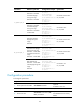
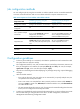
To configure a scheduled job:
Step Command Remarks
1. Enter system view.
system-view N/A
2. Create a job and enter
job view.
job job-name N/A
3. Specify the view in which
the commands in the job
run.
view view-name
You can specify only one view for
a job. The job executes all
commands in the specified view.
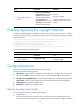
4. Add commands to the
job.
• Configure a command to run at a
specific time and date:
time time-id at time date command
command
• Configure a command to run at a
specific time:
time time-id { one-off | repeating }
at time [ month-date month-day |
week-day week-daylist ] command
command
• Configure a command to run after a
delay:
time time-id { one-off | repeating }
delay time command command
Use any of the commands.
NOTE:
Changing a clock setting does not
affect the schedule set by using the
time at or time delay command.
Scheduled job configuration example
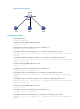
Network requirements
Configure scheduled jobs on the device to enable interfaces Ethernet 1/1, Ethernet 1/2, and Ethernet
1/3 at 8:00 and disabled them at 18:00 on working days every week, to control the access of the PCs
connected to these interfaces.