
R2511-HP MSR Router Series Fundamentals Configuration Guide(V5)



91
Job configuration methods
You can configure jobs by using the non-modular or modular method. Use the non-modular method for
a one-time command execution and use non-modular method for complex maintenance work.
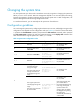
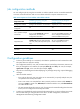
Table 22 A comparison of non-modular and modular methods
Comparison item
Scheduling a job by using the
non-mod
ular method
Scheduling a job by using the
modular method
Configuration method
Configure all elements in one command
Separate job, view, and time settings
Can multiple jobs be
configured?
No Yes
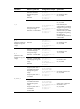
Can a job have multiple
commands?
No
If you use the schedule job command
multiple times, the most recent
configuration takes effect.
Yes
You can use the time command in job
view to configure commands to be
executed at different time points.
Supported views
User view and system view. In the
schedule job command, shell represents
user view, and system represents system
view.
All views. In the time command,
monitor represents user view.
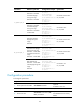
Supported commands Commands in user view and system view
Commands in all views
Can a job be repeatedly
executed?
No Yes
Can a job be saved? No Yes
Configuration guidelines
• To have a job successfully run a command, check that the specified view and command are valid.
The system does not verify their validity.
• The configuration interface, view, and user status that you have before job execution restores even
if the job changed the user interface (for example, telnet, ftp, and ssh2), the view (for example,
system-view and quit), or the user status (for example, super).
• The jobs run in the background without displaying any messages except log, trap and debugging
messages.
• With the modular method:
{ Every job can have only one view and up to 10 commands. If you specify multiple views, the
one specified most recently takes effect.
{ Enter a view name in its complete form. Most commonly used view names include monitor for
user view, system for system view, Ethernetx/x for Ethernet interface view, and Vlan-interfacex
for VLAN interface view.
{ The time ID (time-id) must be unique in a job. If two time and command bindings have the same
time ID, the one configured most recently takes effect.
• To make sure scheduled jobs can be executed at the expected time, you must configure an accurate
time and data setting or configure NTP for the device. For NTP configuration, see Network
Management and Monitoring Configuration Guide.