
R2511-HP MSR Router Series Fundamentals Configuration Guide(V5)



84
Changing the system time
You must synchronize your device with a trusted time source by using NTP or changing the system time
before you run it on the network. Network management depends on an accurate system time setting,
because the timestamps of system messages and logs use the system time. For NTP configuration, see
Network Management and Monitoring Configuration Guide.
In a small-sized network, you can manually set the system time of each device.
Configuration guidelines
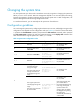
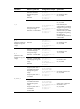
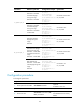
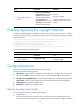
You can change the system time by configuring the relative time, time zone, and daylight saving time. The
configuration result depends on their configuration order (see Table 21)
. In the first column of this table,
1 represents the clock datetime command, 2 represents the clock timezone command, and 3 represents
the clock summer-time command. To verify the system time setting, use the display clock command. This
table assumes that the original system time is 2005/1/1 1:00:00.
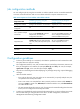
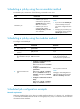
Table 21 System time configuration results
Command Effective s
y
stem time
Confi
g
uration exam
p
le
S
y
stem time
1 date-time
clock datetime 1:00
2007/1/1
01:00:00 UTC Mon
01/01/2007
2
Original system time ±
zone-offset
clock timezone
zone-time add 1
02:00:00 zone-time Sat
01/01/2005
1, 2 date-time ±
zone-offset
clock datetime 2:00
2007/2/2
clock timezone
zone-time add 1
03:00:00 zone-time Fri
02/02/2007
2, 1 date-time
clock timezone
zone-time add 1
clock datetime 3:00
2007/3/3
03:00:00 zone-time Sat
03/03/2007
3
The original system time
outside the daylight
saving time range:
The system time does not
change until it falls into
the daylight saving time
range.
clock summer-time ss
one-off 1:00
2006/1/1 1:00
2006/8/8 2
01:00:00 UTC Sat
01/01/2005
The original system time
in the daylight saving time
range:
The system time increases
by summer-offset.
clock summer-time ss
one-off 00:30
2005/1/1 1:00
2005/8/8 2
03:00:00 ss Sat
01/01/2005
If the original system time
plus summer-offset is
beyond the daylight saving
time range, the original
system time does not
change. After you disable
the daylight saving setting,
the system time
automatically decreases by
summer-offset.