
R2511-HP MSR Router Series Fundamentals Configuration Guide(V5)

75
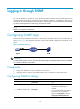
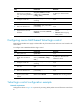
Ste
p
Command
Remarks
3. Configure an SNMP
group and specify its
access right.
snmp-agent group v3 group-name
[ authentication | privacy ]
[ read-view read-view ] [ write-view
write-view ] [ notify-view
notify-view ] [ acl acl-number | acl
ipv6 ipv6-acl-number ] *
By default, no SNMP group is
configured.
4. Add a user to the SNMP
group.
snmp-agent usm-user v3 user-name
group-name [ [ cipher ]
authentication-mode { md5 | sha }
auth-password [ privacy-mode
{ 3des | aes128 | des56 }
priv-password ] ] [ acl acl-number |
acl ipv6 ipv6-acl-number ] *
N/A
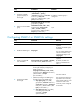
Configuring SNMPv1 or SNMPv2c settings
Ste
p
Command
Remarks
1. Enter system view.
system-view N/A
2. Enable the SNMP agent.
snmp-agent
Optional.
By default, the SNMP agent
is disabled.
You can enable SNMP agent
with this command or any
command that begins with
snmp-agent.
3. Create or update MIB
view information.
snmp-agent mib-view { excluded | included }
view-name oid-tree [ mask mask-value ]
Optional.
By default, the MIB view
name is ViewDefault and
OID is 1.
4. Configure the SNMP
access right.
• (Method 1) Specify the SNMP NMS
access right directly by configuring an
SNMP community:
snmp-agent community { read | write }
community-name [ mib-view view-name ]
[ acl acl-number | acl ipv6
ipv6-acl-number ] *
• (Method 2) Configure an SNMP group
and add a user to the SNMP group:
a. snmp-agent group { v1 | v2c }
group-name [ read-view read-view ]
[ write-view write-view ] [ notify-view
notify-view ] [ acl acl-number | acl
ipv6 ipv6-acl-number ] *
b. snmp-agent usm-user { v1 | v2c }
user-name group-name [ acl
acl-number | acl ipv6
ipv6-acl-number ] *
Use either method.
The username for method 2 is
equivalent to the community
name used for method 1, and
must be the same as the
community name configured
on the NMS.