
R2511-HP MSR Router Series Fundamentals Configuration Guide(V5)

74
Logging in through SNMP
You can run SNMP on an NMS to access the device MIB and perform GET and SET operations to
manage and monitor the device. The device supports SNMPv1, SNMPv2c, and SNMPv3, and can work
with various network management software products, including IMC. For more information about SNMP,
see Network Management and Monitoring Configuration Guide.
NOTE:
SNMP is not supported in FIPS mode.
Configuring SNMP login
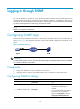
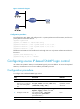
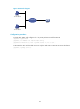
Connect the PC (the NMS) and the device to the network, making sure they can reach each other, as
shown in Figure 39. T
his document describes only the basic SNMP configuration procedures on the
device.
Figure 39 Network diagram
IMPORTANT:
To make SNMP operate correctly, make sure the SNMP settin
g
s (includin
g
the SNMP version) on the NMS
are consistent with those on the device.
Prerequisites
• Assign an IP address to a Layer 3 interface on the device.
• Configure routes to make sure the NMS and the Layer 3 interface can reach each other.
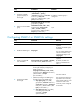
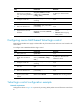
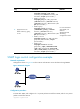
Configuring SNMPv3 settings
Ste
p
Command
Remarks
1. Enter system view.
system-view N/A
2. Enable the SNMP agent.
snmp-agent
Optional.
By default, the SNMP agent is
disabled.
You can enable SNMP agent with this
command or any command that
begins with snmp-agent (except for
snmp-agent calculate-password).