
R2511-HP MSR Router Series Fundamentals Configuration Guide(V5)

71
<Sysname> system-view
[Sysname] interface ethernet1/1
[Sysname-Ethernet1/1] ip address 192.168.0.58 255.255.255.0
[Sysname-Ethernet1/1] quit
# Create a local user named admin, and set the password to admin for the user. Specify the Web
service type for the local user, and set the command level to 3 for this user.
[Sysname] local-user admin
[Sysname-luser-admin] service-type web
[Sysname-luser-admin] authorization-attribute level 3
[Sysname-luser-admin] password simple admin
2. Verify the configuration:
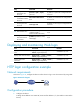
# On the PC, run the Web browser. Enter the IP address of the device in the address bar. The Web
login page appears, as shown in Figure 37.
Figure 37 Web login page
# Enter the user name, password, verify code, select English, and click Login. The homepage
appears. After login, you can configure device settings through the Web interface.
HTTPS login configuration example
Network requirements
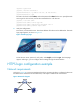
As shown in Figure 38, to prevent unauthorized users from accessing the device, configure the device as
the HTTPS server and the host as the HTTPS client, and request a certificate for each of them.
Figure 38 Network diagram