
R2511-HP MSR Router Series Fundamentals Configuration Guide(V5)

70
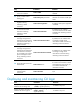
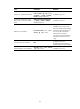
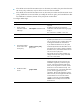
Ste
p
Command
Remarks
12. Configure a
password for the
local user.
password { cipher | simple }
password
By default, no password is configured for the
local user.
13. Specify the
command level of the
local user.
authorization-attribute level
level
By default, no command level is configured for
the local user.
14. Specify the Web
service type for the
local user.
service-type web
By default, no service type is configured for the
local user.
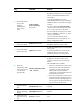
15. Exit to system view.
quit N/A
16. Enter interface view.
interface interface-type
{ interface-number |
interface-number.subnumber }
N/A
17. Assign an IP address
and subnet mask to
the interface.
ip address ip-address { mask |
mask-length }
N/A
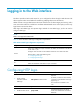
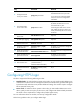
Displaying and maintaining Web login
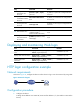
Task Command Remarks
Display information about Web
users.
display web users [ | { begin | exclude |
include } regular-expression ]
Available in any view.
Display HTTP state information.
display ip http [ | { begin | exclude |
include } regular-expression ]
Available in any view.
Display HTTPS state
information.
display ip https [ | { begin | exclude |
include } regular-expression ]
Available in any view.
HTTP login configuration example
Network requirements
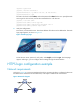
As shown in Figure 36, configure the device to allow the PC to log in over the IP network by using HTTP.
Figure 36 Network diagram
Configuration procedure
1. Configure the device:
# Assign the IP address 192.168.0.58/24 to interface Ethernet 1/1 (the interface connected to
the PC).