
R2511-HP MSR Router Series Fundamentals Configuration Guide(V5)

69
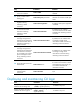
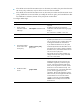
Ste
p
Command
Remarks
5. Associate the HTTPS
service with a
certificate
attribute-based
access control
policy.
ip https certificate
access-control-policy
policy-name
Optional.
By default, the HTTPS service is not associated
with any certificate-based attribute access
control policy.
Associating the HTTPS service with a
certificate-based attribute access control policy
enables the device to control the access rights
of clients.
You must configure the client-verify enable
command in the associated SSL server policy.
If not, no clients can log in to the device.
The associated SSL server policy must contain
at least one permit rule. Otherwise, no clients
can log in to the device.
For more information about certificate
attribute-based access control policies, see
Security Configuration Guide.
6. Specify the HTTPS
service port number.
ip https port port-number
Optional.
The default HTTPS service port is 443.
7. Associate the HTTPS
service with an ACL.
ip https acl acl-number
By default, the HTTPS service is not associated
with any ACL.
Associating the HTTPS service with an ACL
enables the device to allow only clients
permitted by the ACL to access the device.
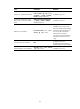
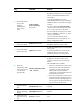
8. Specify the
authentication mode
for users trying to log
in to the device
through HTTPS.
web https-authorization mode
{ auto | manual }
Optional.
By default, a user must enter the correct
username and password to log in through
HTTPS.
When the auto mode is enabled:
• If the user's PKI certificate is correct and not
expired, the CN field in the certificate is
used as the username to perform AAA
authentication. If the authentication
succeeds, the user automatically enters the
Web interface of the device.
• If the user's PKI certificate is correct and not
expired, but the AAA authentication fails,
the device shows the Web login page. The
user can log in to the device after entering
correct username and password.
9. Set the Web user
connection timeout
time.
web idle-timeout minutes Optional.
10. Set the size of the
buffer for Web login
logging.
web logbuffer size pieces Optional.
11. Create a local user
and enter local user
view.
local-user user-name N/A