
R2511-HP MSR Router Series Fundamentals Configuration Guide(V5)

68
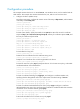
• If the HTTPS service and the SSL VPN service use the same port number, they must have the same
SSL server policy. Otherwise, only one of the two services can be enabled.
• If the HTTPS service and the SSL VPN service use the same port number and the same SSL server
policy, disable the two services before you modify the SSL server policy, and re-enable them after
the modification. Otherwise, the SSL server policy does not take effect.
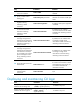
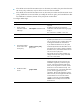
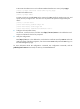
To configure HTTPS login:
Ste
p
Command
Remarks
1. Specify a fixed
verification code for
Web login.
web captcha verification-code
Optional.
By default, a Web user must enter the
verification code indicated on the login page
to log in.
This command is available in user view.
2. Enter system view.
system-view N/A
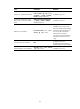
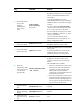
3. Associate the HTTPS
service with an SSL
server policy.
ip https ssl-server-policy
policy-name
Optional.
By default, the HTTPS service is not associated
with any SSL server policy, and the device uses
a self-signed certificate for authentication.
If you disable the HTTPS service, the system
automatically de-associates the HTTPS service
from the SSL service policy. Before re-enabling
the HTTPS service, associate the HTTPS service
with an SSL server policy first.
If the HTTPS service has been enabled, any
changes to the SSL server policy associated
with it do not take effect.
4. Enable the HTTPS
service.
ip https enable
By default, HTTPS is disabled.
Enabling the HTTPS service triggers an SSL
handshake negotiation process. During the
process, if the local certificate of the device
exists, the SSL negotiation succeeds, and the
HTTPS service can be started correctly. If no
local certificate exists, a certificate application
process will be triggered by the SSL
negotiation. Because the application process
takes much time, the SSL negotiation often fails
and the HTTPS service cannot be started
correctly. In that case, execute the ip https
enable command multiple times to start the
HTTPS service.