
R2511-HP MSR Router Series Fundamentals Configuration Guide(V5)

67
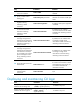
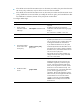
Ste
p
Command
Remarks
4. Configure the HTTP
service port number.
ip http port port-number
Optional.
The default HTTP service port is 80.
If you execute the command multiple
times, the most recent configuration
takes effect.
5. Associate the HTTP
service with an ACL.
ip http acl acl-number
Optional.
By default, the HTTP service is not
associated with any ACL.
Associating the HTTP service with an
ACL enables the device to allow only
clients permitted by the ACL to access
the device.
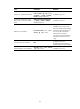
6. Set the Web connection
timeout time.
web idle-timeout minutes Optional.
7. Set the size of the buffer
for Web login logging.
web logbuffer size pieces Optional.
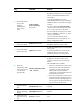
8. Create a local user and
enter local user view.
local-user user-name N/A
9. Configure a password
for the local user.
password { cipher | simple }
password
By default, no password is configured
for the local user.
10. Specify the command
level of the local user.
authorization-attribute level level
No command level is configured for the
local user.
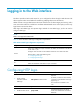
11. Specify the Telnet service
type for the local user.
service-type web
By default, no service type is
configured for the local user.
12. Exit to system view.
quit N/A
13. Enter interface view.
interface interface-type
{ interface-number |
interface-number.subnumber }
N/A
14. Assign an IP address
and subnet mask to the
interface.
ip address ip-address { mask |
mask-length }
N/A
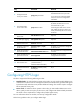
Configuring HTTPS login
The device supports the following HTTPS login modes:
• Simplified mode—To make the device operate in this mode, you only need to enable HTTPS service
on the device. The device will use a self-signed certificate (a certificate that is generated and signed
by the device itself, rather than a CA) and the default SSL settings. This mode is simple to configure
but has potential security risks.
• Secure mode—To make the device operate in this mode, you must enable HTTPS service on the
device, specify an SSL server policy for the service, and configure PKI domain-related parameters.
This mode is more complicated to configure but provides higher security.
For more information about SSL and PKI, see Security Configuration Guide.
Follow these guidelines when you configure HTTPS login: