
R2511-HP MSR Router Series Fundamentals Configuration Guide(V5)

66
Logging in to the Web interface
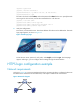
The device provides a built-in Web server for you to configure the device through a Web browser. The
device supports HTTP 1.0 and HTTPS for transferring webpage data across the Internet.
HTTPS uses SSL to encrypt data between the client and the server for data integrity and security, and is
more secure than HTTP. You can define a certificate attribute-based access control policy to allow only
legal clients to access the device.
HTTP login and HTTPS login are separate login methods. To use HTTPS login, you do not need to
configure HTTP login.
NOTE:
HTTP is not supported in FIPS mode.
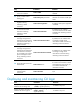
Table 20 shows the basic Web login configuration requirements.
Table 20 Basic Web login configuration requirements
Ob
j
ect Re
q
uirements
Device
Assign an IP address to a Layer 3 interface. By default, the IP address of the device
is 192.168.1.1/24.
Configure routes to make sure the interface and the PC can reach each other.
Perform either or both of the following task:
• Configuring HTTP login
• Configuring HTTPS login
PC
Install a Web browser.
Obtain the IP address of the device's Layer 3 interface.
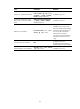
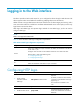
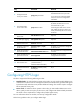
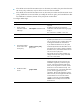
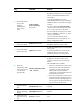
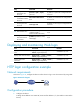
Configuring HTTP login
Ste
p
Command
Remarks
1. Specify a fixed
verification code for
Web login.
web captcha verification-code
Optional.
By default, a Web user must enter the
verification code indicated on the login
page to log in.
This command is available in user
view.
2. Enter system view.
system-view N/A
3. Enable the HTTP service.
ip http enable
The default depends on the device
model. See Fundamentals Command
Reference.