
R2511-HP MSR Router Series Fundamentals Configuration Guide(V5)



63
Ste
p
Command
Remarks
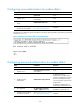
13. Configure the flow control
mode.
flow-control { hardware | none |
software }
flow-control hardware
flow-control-type1 [ software
flow-control-type2 ]
flow-control software
flow-control-type1 [ hardware
flow-control-type2 ]
The default is as follows:
• Independent AUX
port—Hardware flow control.
• Console and AUX integrated
port—Off.
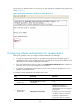
14. Configure the type of
terminal display.
terminal type { ansi | vt100 }
By default, the terminal display type
is ANSI.
The device supports two types of
terminal display: ANSI and VT100.
HP recommends that you set the
display type of both the device and
the client to VT100. If the device and
the client use different display types
(for example, HyperTerminal or
Telnet terminal) or both are set to
ANSI, when the total number of
characters of the currently edited
command line exceeds 80, an
anomaly such as cursor corruption
or abnormal display of the terminal
display might occur on the client.
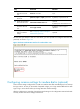
15. Configure the user privilege
level for login users.
user privilege level level 0 by default.
16. Set the maximum number of
lines to be displayed on a
screen.
screen-length screen-length
By default, a screen displays 24
lines at most.
A value of 0 disables the function.
17. Set the size of the command
history buffer.
history-command max-size value
By default, the buffer saves 10
history commands at most.
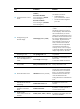
18. Set the idle-timeout timer.
idle-timeout minutes [ seconds ]
The default idle-timeout is 10
minutes. The system automatically
terminates the user's connection if
there is no information interaction
between the device and the user
within the idle-timeout time.
Setting idle-timeout to 0 disables the
timer.
19. Set the maximum interval
allowed between off-hook
and dialing.
modem timer answer time
By default, the interval is 60
seconds.
20. Configure a modem to
operate in auto-answer
mode.
modem auto-answer
By default, a modem operates in
non-auto answer mode.
21. Enable modem
call-in/call-out on the user
interface.
modem { both | call-in | call-out }
By default, both modem call-in and
call-out are disabled.