
R2511-HP MSR Router Series Fundamentals Configuration Guide(V5)



59
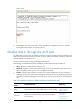
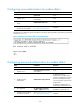
The next time you attempt to dial in to the device, you must provide the configured login password, as
shown in Figure 34.
Figure 34 Password a
uthentication interface for modem dial-in users
Configuring scheme authentication for modem dial-in
Follow these guidelines when you configure scheme authentication for AUX login:
• To make the command authorization or command accounting function take effect, apply an
HWTACACS scheme to the intended ISP domain. This scheme must specify the IP address of the
authorization server and other authorization parameters.
• If the local authentication scheme is used, use the authorization-attribute level level command in
local user view to set the user privilege level on the device.
• If a RADIUS or HWTACACS authentication scheme is used, set the user privilege level on the
RADIUS or HWTACACS server.
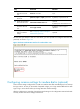
To configure scheme authentication for modem dial-in users:
Ste
p
Command
Remarks
1. Enter system view.
system-view N/A
2. Enter AUX user
interface view.
user-interface aux first-number
[ last-number ]
N/A
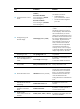
3. Enable scheme
authentication.
authentication-mode scheme
Whether local, RADIUS, or
HWTACACS authentication is
adopted depends on the configured
AAA scheme.
By default, password authentication
is enabled on AUX user interfaces.
By default, no authentication is
performed on AUX user interfaces.