
R2511-HP MSR Router Series Fundamentals Configuration Guide(V5)



58
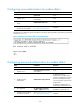
Configuring none authentication for modem dial-in
Ste
p
Command
Remarks
1. Enter system view.
system-view N/A
2. Enter one or more AUX user
interface views.
user-interface aux first-number
[ last-number ]
N/A
3. Enable none authentication
mode.
authentication-mode none N/A
4. Configure common settings
for the AUX user interfaces.
See "Configuring common settings
for modem di
al-in (optional)."
Optional.
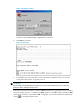
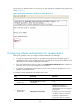
The next time you attempt to dial in to the device, you do not need to provide any username or password,
as shown in Figure 33.
Figure 33 Dialing in to the device wit
hout any authentication
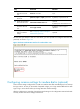
Configuring password authentication for modem dial-in
Ste
p
Command
Remarks
1. Enter system view.
system-view N/A
2. Enter one or more AUX user
interface views.
user-interface aux first-number
[ last-number ]
N/A
3. Enable password
authentication.
authentication-mode password
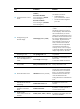
By default, password
authentication is enabled, but no
password is configured. To access
the device through the AUX port,
you must configure a password for
authentication.
By default, no authentication is
performed for modem dial-in users.
4. Set a password.
set authentication password
{ cipher | simple } password
By default, no password is set.
5. Configure common settings
for AUX user interfaces.
See "Configuring common settings
for modem dial
-in (optional)."
Optional.