
R2511-HP MSR Router Series Fundamentals Configuration Guide(V5)



57
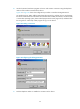
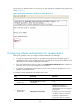
Figure 31 Dialing the number
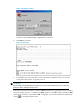
Character string CONNECT9600 is displayed on the terminal.
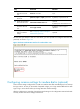
8. Press Enter as prompted.
Figure 32 Login page
9. At the default user view prompt <HP>, enter commands to configure the device or check the
running status of the device. To get help, enter ?.
IMPORTANT:
Do not directly close the HyperTerminal. Doing so can cause some modems to stay in use, and your
subsequent dial-in attempts will always fail.
To disconnect the PC from the device, execute the ATH command in the HyperTerminal. If the command
cannot be entered, type AT+ + + and then press Enter. When the word "OK" appears, execute the ATH
command. The connection is terminated if "OK" is displayed. You can also terminate the connection by
clicking in the HyperTerminal window.