
R2511-HP MSR Router Series Fundamentals Configuration Guide(V5)



54
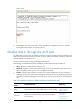
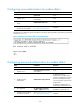
Figure 27 CLI
6. At the default user view prompt <HP>, enter commands to configure the device or check the
running status of the device. To get help, enter ?.
Modem dial-in through the AUX port
An administrator can use a pair of modems to remotely connect to the device through its AUX port over
PSTN when the IP network connection is broken. To do so, make sure the dial-in connection, the device,
and the modems are correctly set up.
To improve device security, configure AUX login authentication.
The following are authentication modes available for modem dial-in through the AUX port:
• None—Requires no authentication and is insecure.
• Password—Requires a password for accessing the CLI. If your password was lost, log in to the
device through the console port to view or modify the password.
• Scheme—Uses the AAA module to provide local or remote authentication. If your username or
password was lost, log in to the device through the console port to view or modify the setting. If the
username or password configured on a remote server was lost, contact the server administrator for
help.
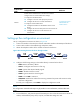
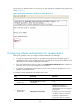
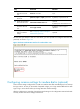
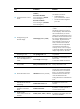
Table 19 Configuration required for different modem login authentication modes
Authentication
mode
Configuration task Reference
None Set the authentication mode to none for the AUX user interface.
"Configuring none
authentication for
modem dial-in"
Password
Enable password authentication on the AUX user interface.
Set a password.
"Configuring
password
authentication for
modem dial-in"