
R2511-HP MSR Router Series Fundamentals Configuration Guide(V5)

52
IMPORTANT:
• Identify the mark on the console port and make sure you are connecting to the correct port.
• The serial ports on PCs do not support hot swapping. If the switch has been powered on, always
connect the console cable to the PC before connecting to the switch, and when you disconnect the
cable, first disconnect from the switch.
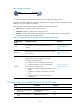
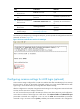
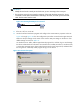
Figure 23 Connecting the AUX port to a terminal
3. If the PC is off, turn on the PC.
4. Launch the terminal emulation program and configure the communication properties on the PC.
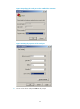
Figure 24 through Figure 26 show the
configuration procedure on Windows XP HyperTerminal.
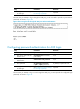
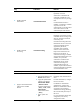
Make sure the port settings are the same as the common AUX port settings on the device. If the
default settings are used, see Table 18.
On Windows Server 2003, add the HyperT
erminal program first, and then log in to and manage
the device as described in this document. On Windows Server 2008, Windows 7, Windows Vista,
or some other operating system, obtain a third-party terminal control program first, and then follow
the user guide or online help of that program to log in to the device.
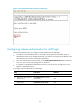
Figure 24 Connection description