
R2511-HP MSR Router Series Fundamentals Configuration Guide(V5)

51
Ste
p
Command
Remarks
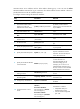
23. Configure the user interface to
change carriage returns 0x0d
0x0a and 0x0d 0x00 received
from Telnet clients to 0x0d
during redirecting a Telnet
connection.
redirect return-deal from-telnet
By default, the user interface does
not change carriage returns
received from Telnet clients during
redirecting a Telnet connection.
24. Configure the user interface to
change carriage returns 0x0d
0x0a and 0x0d 0x00 received
from a terminal (a PC
connected to the console port
for example) to 0x0d during
redirecting a Telnet connection.
redirect return-deal
from-terminal
By default, the user interface does
not change carriage returns
received from a terminal during
redirecting a Telnet connection.
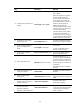
25. Set the idle timeout timer for
Telnet redirect.
redirect timeout time
360 seconds by default.
If no data is received from a Telnet
client before the timer expires, the
user interface terminates the
redirected connection.
26. Manually terminate redirected
Telnet connections.
redirect disconnect N/A
Login procedure
To log in through the AUX port:
• Complete the authentication settings on the AUX user interface. By default, password authentication
is enabled, but no password is set. To use password authentication, you must set a password for
password authentication.
• Make sure the configuration terminal has a terminal emulation program (for example,
HyperTerminal in Windows XP).
• Port settings of the terminal emulation program must be the same as the settings of the AUX
port. Table 18 lists the de
fault AUX port properties.
Table 18 Default AUX port properties
Parameter Default
Bits per second 9600 bps
Flow control
• Independent AUX port: Hardware flow control
• Console and AUX integrated port: Off
Parity None
Stop bits 1
Data bits 8
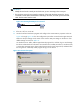
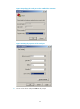
To log in through the AUX port from the configuration terminal (for example, a PC):
1. Connect the DB-9 female connector of the console cable to the serial port of the PC.
2. Connect the RJ-45 connector of the console cable to the AUX port of the device.